相信用 eclipse 開發 web 時,每次 compile 完 java 後 tomcat 就需要重新啟動,應該覺得讓人非常的想把電腦丟掉
最近試了一下 JRebel ,發現他的神奇之處,Java compile 完後馬上就可以試改過後的結果,不用等 1 鐘後 tomcat 重啟然後還要重新 login 到需要的 page 在測試跑完的結果
以每個工程師去寫 web 而言,平均至少要花約 30~60 次來重啟 tomcat ,每一次重啟 tomcat 後再加上登入到需要的頁面再做測試,每次約要 2-3 分鐘
30*2 ~ 60*3 = 60 ~ 180 分鐘。若每天可以省下這些時間,相信 programmer 的產出應該會比目前的方式快上 20% ~ 30% 以上,可謂京人啊
用 Java 寫 Web 的工程師都應該用 JRebel 做為中介去開發,每天省下兩小時,不只可以提高生產率,也可以讓自己有多餘的時間去休息。
雙贏的事,為何不做呢!!!!
Showing posts with label 軟體工程. Show all posts
Showing posts with label 軟體工程. Show all posts
Wednesday, April 20, 2011

Tuesday, October 5, 2010
Java Build Server
今天在 theserverside 發現一篇有去的 article
http://www.zenbi.nl/en/blog_how_to_build_a_java_buildserver.php
這份 article 在講解如何去建立一個 build server ,讓程式開發可以自動化做 build 與 Test ,減少人工的浪費。
目前 build tool 中比較 popular 的有 luntbuild, hudson, apache continuum ,此 article 建議用 luntbuild ,個人用過 luntbuild ,比較起來 luntbuild 太基本,必須用 professional 才能滿足比較大的需求。hudson 最近研究過,發現此 build tool 可以支援 plugin 功能,大大的增加其運用彈性,在此建議此 build tool 。continuum 也是比較基本的 build tool
build tool 已經漸漸的變成軟體開發的一環,須要建立起來才能有效控管軟體的 productivity and Quality
http://www.zenbi.nl/en/blog_how_to_build_a_java_buildserver.php
這份 article 在講解如何去建立一個 build server ,讓程式開發可以自動化做 build 與 Test ,減少人工的浪費。
目前 build tool 中比較 popular 的有 luntbuild, hudson, apache continuum ,此 article 建議用 luntbuild ,個人用過 luntbuild ,比較起來 luntbuild 太基本,必須用 professional 才能滿足比較大的需求。hudson 最近研究過,發現此 build tool 可以支援 plugin 功能,大大的增加其運用彈性,在此建議此 build tool 。continuum 也是比較基本的 build tool
build tool 已經漸漸的變成軟體開發的一環,須要建立起來才能有效控管軟體的 productivity and Quality
Wednesday, June 23, 2010
邁向高品質程式碼的12個步驟
軟體工程師永遠追求高品質的系統,但如何達到,參考一下下列文章吧
1. 你有使用原始碼控制系統嗎?
我使用過一些商用原始檔控制系統(source control packages),也用過免費的CVS,所以我可以告訴你CVS相當不錯!如果你沒有原始碼控制系統,一旦需要與程式設計人員合作就相當麻煩了。因為程式設計人員無法知道其他人做了什麼,也無法輕易回復成出錯前的狀態。而且原始碼控制系統還有另一個優點,就是原始碼會被簽出(check out)到每位程式設計人員的硬碟裡。我還沒看過哪個用了原始碼控制的專案會遺失大量程式的。
2. 你能用一個步驟建出所有結果嗎?
我的意思是:從最新的原始碼快照開始,要花多少步驟才能建立出貨用的軟體?好的團隊會有單一個腳本檔,只要執行這個腳本,就會從頭簽出所有檔案、編譯每一行程式、建立執行檔(包含所有不同版本、語言以及#ifdef組合)、製作安裝程式,並且產生最後要用的媒體格式:光碟片、網站下載或是其他各種格式。
如果這個程序不是只有一個步驟,就會容易出錯。另外,當出貨時程緊迫時,修正「最後一個」問題、製作最終執行檔等過程必須要快速完成。如果程式編譯和安裝檔製作等動作需要20個步驟才能完成,你一定會急瘋了,然後做出一些蠢事。
就是為了這一點,我的前一家公司把原本使用的WISE換成InstallShield。因為我們必須透過NT工作排程器,在夜間用腳本自動製作出安裝程式,由於WISE無法透過工作排程器半夜執行,因此就把它丟掉了(親切的WISE員工跟我保證,他們的最新版一定會支援夜間執行)。
3. 你有進行每日編譯嗎?
在使用原始碼控制工具時,有時程式設計人員會不慎提交(check in)某些內容而導致編譯失敗。舉例來說,某人新增了一個原始檔,整個程式在他的機器上都能正常編譯,可是卻忘記把新增的原始檔加到原始碼控制程式庫中。結果這位仁兄非常健忘且愉快地鎖上機器回家了,導致其他人無法做事,也只好很不爽地回家。
導致編譯失敗是非常糟糕的事情(又經常發生),這時每日編譯就很有幫助了,它能保證不會有漏網之魚。在大型的團隊中,要確保能立即修正編譯失敗的最佳方法就是每天下午(像是午餐時間)重新編譯。大家在午餐前盡可能的提交檔案,等大家用餐完畢編譯也已經完成。若結果顯示正常,很好!大家可以簽出最新版的原始碼繼續工作;如果有問題就將它搞定,而其他人還可以用前一版沒問題的程式繼續幹活。
Excel團隊有個規定,導致編譯失敗的人必須從此負責重新編譯的動作當作處罰,直到有其他人出錯為止。這能讓大家盡量避免造成編譯失敗,同時也是個讓大家輪流熟悉重新編譯的好方法。在我的文章:「每日編譯是你的好朋友」裡有更多每日編譯的資料。
4. 你有沒有問題(bug)資料庫?
無論如何,只要你在寫程式時(只有一個人寫也是一樣),沒有一套良好的資料庫列出程式中所有的問題,就一定會產生出品質低劣的程式碼。很多程式設計人員自認能把問題清單記在腦子裡,才怪!我從來沒辦法一次記住超過二或三個問題,而且會在第二天早上,或是趕著出貨時把它們全部忘掉。你一定要正式地記錄問題。
問題資料庫可大可小。一個最簡單有用的問題資料庫必須包含每個問題的下列資料:
● 重現問題的完整步驟。
● 應該看到的行為。
● 實際看到的(有問題的)行為。
● 被指派的負責人。
● 是否已修正。
如果你是因為覺得問題追蹤軟體太複雜才不追蹤問題,請建立五欄的簡單表格,填入上述資料,然後開始使用吧!想要深入瞭解問題追蹤,請參閱「無痛錯誤追蹤」一文。
5. 你會先把問題都修好之後,才寫新的程式嗎?
古早第一版的Microsoft Word for Windows被視為「死亡行軍」型的專案。進度一直處在落後的情況。整個團隊的工作時間長得離譜,專案卻一延再延三延,大家都承受無比的壓力。拖了幾年後,那個鬼東西終於上市了,微軟就把整個團隊送到Cancun(墨西哥著名海灘)渡假,然後再坐下來做深度反省。
他們發現產品經理過度堅持要維持「進度」,而程式設計人員只能匆匆經過編碼階段。而且正式的時程並未包含錯誤修正這個階段,於是寫出的程式碼非常糟糕。此外,也沒有人試圖要減少問題數量,而事實剛好相反!有位程式設計人員要寫支程式以計算一行文字的高度,結果他只寫了「return 12;」,並等問題報告出爐指出這個函數功能不對。於是,時程表變成一份等著被轉換成問題的功能列表,事後檢討時則稱之為「無窮錯誤法(Infinite defects methodology)」。
為了修正這個問題,微軟全面採用所謂的「零錯誤作法(Zero defects methodology)」。公司裡很多程式設計人員聽了都不禁竊笑,因為感覺就像是管理階層認為能用行政命令降低錯誤數量一樣。實際上,「零錯誤」是指無論何時都要先修正錯誤才能寫新程式。原因如下:
一般來說,愈晚修正錯誤,修正時所付出的成本(時間及金錢)愈高。舉例來說,當你打錯字或出現編譯器會發現的語法錯誤,就修正只是小事一樁。
若你的程式第一次執行出錯時,應該也能立即改正,因為整個程式還在你腦海裡。如果要為幾天前寫的程式除錯,應該需要回想一陣子吧!不過,當你重讀所寫的程式後,就會記起所有細節,並在適當時間內把問題修好。
若是要為幾個月前寫的程式除錯,那很有可能已經忘掉一大半,要修正簡直難上加難!或許,你正在替別人的程式除錯,而當事人遠在阿盧巴渡假,這時除錯的任務就像科學一樣:你得條理分明、小心翼翼地慢慢來,也無法確定要多久時間才能解決。另外,如果要為已出貨的程式除錯,修正問題的代價就更難以估算了!
這就是要立即修正問題的理由之一,因為這樣做能少花點時間。另一個理由是,寫新程式的時間遠比修正現有錯誤的時間容易估計。舉例來說,如果要你估計寫串列排序的程式需時多久,你應該能估算得相當準確;但假如你的程式在裝了Internet Explorer 5.5之後有問題,要估計需要多久才能修好,恐怕用猜的都猜不出來,因為你不知道(當然不知道)問題點在哪裡。要找出問題可能就要花上三天,但也可能兩分鐘內解決。
如果時程裡包含很多有待修正的問題,那麼這種時程是不可靠的。假如把已知的錯誤都修好了,剩下的就只有新程式了,那麼時程就會變得非常準確。
把錯誤數量維持在零還有另外一項優點,就是面對競爭時反應可以更快。有些程式設計人員認為這樣做可讓產品隨時推出。一旦競爭者推出某個殺手級新功能來搶客戶時,只要把該功能加上去,即可立即出貨,不必修正累積下來的大量問題。
6. 你有一份最新的時程表嗎?
在此要好好的談時程表。如果你的程式對公司非常重要,有太多理由可以說明,預知程式完成時間點有多麼重要。但程式設計人員是出了名的不愛訂定時程,他們會對著業務部門大吼:「該完成的時候就會完成了阿!」
但是問題不可能就這樣算了。業務人員有太多的規劃決策必須遠在程式出貨之前就做好決定,如:功能展示、商展、廣告等,而做決定的唯一方法就是定出時程,並且隨時更新。
擁有時程的另一個重點是,可以強迫自己決定要製作哪些功能,並剔除最不重要的功能,以避免功能過度膨脹(featuritis,又名scope creep)。
7. 你有寫規格嗎?
寫規格就像是使用牙線:大家都同意這是好事,卻沒有人真的這麼做。
我不知道原因,或許是大多數程式設計人員都討厭寫文件吧!所以當全是程式設計人員的團隊面對問題時,自然傾向用程式碼而非文件來表示。他們寧願跳進去寫程式,死也不願先寫規格。
在設計階段發現問題時,只要改幾行文字就能輕易修正。但等到程式寫出來之後,修正的代價就高多了,代價包含了情感(人們討厭拋棄程式碼)和時間,所以會抗拒修正問題。通常未依據規格製作的軟體,到最後的設計都很糟,而且進度完全無法控制。這似乎就是Netscape所發生的問題。它的前四版一團亂,結果管理階層還愚蠢地決定把程式丟掉重新開始。然後在Mozilla上又重蹈覆轍,製造出一個無法控制的怪物,耗了好幾年才進入alpha測試階段。
我的小秘方是把程式設計人員送去上密集的寫作課程,讓他們變得不那麼排斥寫作,就可以解決這個問題。另一個方法是雇用聰明的產品經理來寫規格。不管用哪一種方法,你都應該強制執行「沒有規格就不寫程式」這個簡單的規則。
8. 程式設計人員有沒有安靜的工作環境?
有大量的文件記載,為知識工作者提供空間安靜及隱私可以提昇產能。軟體管理經典著作《Peopleware》也詳盡地記載了這種產能上的增益。
其中的原理如下。我們都知道知識工作者進入「沉浸狀態」(flow,也稱作in the zone)時,工作效果是最佳的。這時他們會完全與環境脫離,全心專注在工作上。他們忘記時間並絕對專注地產出極佳成果。他們所有豐富的產出也都是在這個時候完成的。作家、程式設計人員、科學家,甚至是籃球員都會告訴你進入「沉浸」的情形。
問題是要進入沉浸並不是那麼容易。你可以試著計時,平均大概要15分鐘才能開始全速工作。一旦碰到累了或是那一天已經有很多創造性的成果,會根本無法進入沉浸,然後就只能看看網頁、玩玩俄羅斯方塊打混過完一天。
另一個問題就是沉浸不容易維持。噪音、電話、同事的中斷(特別是這一點)都會讓你脫離沉浸。假設有個同事問了一個問題只讓你中斷了一分鐘,實際上,卻會讓你完全脫離沉浸,必須再等半個小時才能回復生產力,導致整體產能都出問題了。如果你身在一個喧鬧的開放辦公環境中(就像某些網路公司最愛的類型),行銷部門在程式設計人員旁一直對著電話大喊,那麼你的產能就像一直被中斷的知識工作者一樣顛簸,永遠無法進入理想的「沉浸」。
這對程式設計人員來說是非常嚴重的事情。生產力的多寡在於能否於短期記憶體中處理大量的細節,而任何一種中斷都會讓這些細節完全消失。等你轉回來工作時,就會完全不記得任何細節(例如,正在使用的區域變數名稱,或是搜尋演算法寫到哪了),必須把剛才寫的東西找出來,於是速度就這樣放慢下來,直到你回復為止。
以下做個簡單的計算。就用剛才的說法:打斷程式設計人員的一分鐘,事實上是耗費了15分鐘的產能。假設有兩個程式設計人員Jeff和Mutt,把他們安排在一個標準呆伯特式牛棚相鄰的開放隔間中。Mutt忘了strcpy函數的Unicode版本拼法,他可以花30秒自己查出來,也可以花15秒問Jeff。由於對方就坐在旁邊,所以選擇問Jeff,於是Jeff就分心並損失了15分鐘的產能(但替Mutt省了15秒)。
現在把他們搬到兩間有牆有門的獨立房間裡。如果Mutt忘記那個函數的拼法,他可以花30秒查出來,也可以花45秒過去問Jeff(以典型程式設計人員的身材來說,要離開位置並不輕鬆),結果他就自己查了。於是Mutt損失30秒的產能,不過,卻替Jeff省下15分鐘!
9. 你有沒有用市面上最好的工具?
用編譯式語言撰寫程式得花一些時間進行編譯,可說是一般家用電腦還無法瞬間完成的事情之一。如果你的編譯過程超過幾秒,去找台最新、最棒的電腦可以替你省點時間;如果編譯需要超過15 秒,程式設計人員覺得無聊就會跑去看線上新聞 The Onion,然後陷在裡面耗掉幾個鐘頭的產能。
在單螢幕系統上替 GUI程式除錯並非絕不可能,但用起來很痛苦。當你在撰寫GUI程式時,或許使用兩台螢幕會讓你輕鬆許多。
大部分程式設計人員到最後都必須修飾圖示或工具列所用的圖,可是大部分的人都沒有一個好用的圖形編輯器。雖然用微軟的小畫家修圖實在令人不可思議,不過,卻是多數程式設計人員不得不做的事。
在我的前一家公司,系統管理員會一直傳送自動發送的垃圾信給我,抱怨我在伺服器上使用了超過「 220 MB」的硬碟空間。依據現在硬碟的價格,這點空間的費用還遠不及我所用的衛生紙。即使只花10分鐘清理目錄,也是產能的極大浪費。
一流的開發團隊並不會虐待他們的程式設計人員。工具不佳所引起的挫折感雖然很小,累積起來還是會讓程式設計人員心情超級不爽、外加脾氣暴躁。而心情不爽就等於是無生產力。
不過,程式設計人員也是很容易被酷炫、新潮的東西所賄賂,這比用加薪叫他們工作要便宜得多了!
10. 你有沒有測試人員?
如果你的團隊沒有專門的測試人員(至少每兩到三個程式設計人員要配一名),就可能會推出問題很多的產品,不然就是浪費錢,像是讓時薪 100美元的程式設計人員去做測試員(時薪 30美元)做的事。省下測試員的錢並不是真正的節省,這是非常明顯的道理,但我實在很驚訝很多人卻還認不清這一點。
11. 是否在面試時要求面試的對象試寫程式?
你會不請魔術師先表演幾招就直接雇用嗎?當然不會。你會不先試菜就決定自己婚宴的餐廳嗎?我很懷疑。
儘管如此,現在程式設計人員能否被錄用,都必須要看履歷是否與眾不同?是否與主考官相談甚歡?或是回答出只要查查文件就能知道的瑣碎問題(例如,CreateDialog()和DialogBox()間的差異是什麼?)。你根本不會管他們能否背得出幾百條有關程式設計的瑣事,你真正在意的是他們能否寫出程式。更糟的情況是問那種「啊!我懂了!」的腦筋急轉彎問題;就是那種知道答案時理所當然,可是光看題目時卻覺得莫名其妙。
拜託別再這樣做了!隨便你想怎麼面試都行,不過請記得一定要讓面試者寫些程式。
12. 是否進行走廊使用性測試?
「走廊使用性測試(Hallway usability)」是指在走廊攔住下一位經過的人,然後逼他試用你剛寫好的程式。如果能攔下五個人並且試用完成,就可以發現程式中95%應注意的使用性問題。
設計出良好的使用者介面並沒有想像中那麼困難,但是必須要能夠吸引客戶並購買產品,才是最重要的。你可以參閱我所寫的免費線上使用介面設計書,這是針對程式設計人員的入門書籍。
不過,處理使用者介面有一點最重要:如果你把程式展示給少數幾個人看(事實上,只要五或六個就夠了),就能快速地發現一般人會遇到的主要問題。在Jakob Nielsen的文章中有解釋原因。即使你的UI設計技巧不足,只要強硬逼自己實行不花太多時間的走廊使用性測試,就會讓你的UI水準大幅提昇。(摘錄整理自第三章)
後記
從2000年8月約耳測試問世以來,世界各地的開發人員寄了很多電子郵件來告知他們組織的分數。雖然測試結果的分佈相當平均,但大部分的回覆分數都 介約2或3之間。
聽說有很多開發人員受夠了無組織的「槍手(Gunslinger)」軟體開發實務,假如公司的約耳測試分數太低,便會拒絕到該公司工作。也曾聽過團體經理把約耳測試作為逐步改善團隊改善的程序,並且一路向上的好消息。
在這段期間,很多開發組織似乎走太遠了,已遠遠超過約耳測試所及,而進入了高級官僚動脈硬化的陣痛期。出現這種狀況時你一定會發現,因為人們花在會議準備上的時間遠比開發軟體還多,即使在約耳測試中拿到滿分12分,還是可能會因過多的政治問題和固定負擔而搞砸。以下這一段可別透露是我說的!早自1990年代我還在微軟工作時,所有證據都顯示,該公司因為組織過於龐大、內部政治鬥爭、官僚浪費等原因,幾乎已陷入停頓狀態。證據何在?就拿平板電腦來說,平板電腦只是個某個微軟中階經理會愛的玩意,它的設計似乎讓華盛頓Redmond的產品經理花一整天開會討論,卻是在會議室裡做自己的事,根本沒有參與。但這並不是微軟才有的現象。
如果你發現自己花太多時間在安裝及設置龐大的軟體方法系統、或命名「視覺化XXXX企業架構師」的軟體、甚至是在極致軟體製程開發和UML間反覆來回對團隊進行再教育,直到他們在開發軟體時,只會一直把頭轉來轉去不知所措 ,即使這份約耳測試成績再好,終究還是問題纏身。(摘錄整理自第三章)
1. 你有使用原始碼控制系統嗎?
我使用過一些商用原始檔控制系統(source control packages),也用過免費的CVS,所以我可以告訴你CVS相當不錯!如果你沒有原始碼控制系統,一旦需要與程式設計人員合作就相當麻煩了。因為程式設計人員無法知道其他人做了什麼,也無法輕易回復成出錯前的狀態。而且原始碼控制系統還有另一個優點,就是原始碼會被簽出(check out)到每位程式設計人員的硬碟裡。我還沒看過哪個用了原始碼控制的專案會遺失大量程式的。
2. 你能用一個步驟建出所有結果嗎?
我的意思是:從最新的原始碼快照開始,要花多少步驟才能建立出貨用的軟體?好的團隊會有單一個腳本檔,只要執行這個腳本,就會從頭簽出所有檔案、編譯每一行程式、建立執行檔(包含所有不同版本、語言以及#ifdef組合)、製作安裝程式,並且產生最後要用的媒體格式:光碟片、網站下載或是其他各種格式。
如果這個程序不是只有一個步驟,就會容易出錯。另外,當出貨時程緊迫時,修正「最後一個」問題、製作最終執行檔等過程必須要快速完成。如果程式編譯和安裝檔製作等動作需要20個步驟才能完成,你一定會急瘋了,然後做出一些蠢事。
就是為了這一點,我的前一家公司把原本使用的WISE換成InstallShield。因為我們必須透過NT工作排程器,在夜間用腳本自動製作出安裝程式,由於WISE無法透過工作排程器半夜執行,因此就把它丟掉了(親切的WISE員工跟我保證,他們的最新版一定會支援夜間執行)。
3. 你有進行每日編譯嗎?
在使用原始碼控制工具時,有時程式設計人員會不慎提交(check in)某些內容而導致編譯失敗。舉例來說,某人新增了一個原始檔,整個程式在他的機器上都能正常編譯,可是卻忘記把新增的原始檔加到原始碼控制程式庫中。結果這位仁兄非常健忘且愉快地鎖上機器回家了,導致其他人無法做事,也只好很不爽地回家。
導致編譯失敗是非常糟糕的事情(又經常發生),這時每日編譯就很有幫助了,它能保證不會有漏網之魚。在大型的團隊中,要確保能立即修正編譯失敗的最佳方法就是每天下午(像是午餐時間)重新編譯。大家在午餐前盡可能的提交檔案,等大家用餐完畢編譯也已經完成。若結果顯示正常,很好!大家可以簽出最新版的原始碼繼續工作;如果有問題就將它搞定,而其他人還可以用前一版沒問題的程式繼續幹活。
Excel團隊有個規定,導致編譯失敗的人必須從此負責重新編譯的動作當作處罰,直到有其他人出錯為止。這能讓大家盡量避免造成編譯失敗,同時也是個讓大家輪流熟悉重新編譯的好方法。在我的文章:「每日編譯是你的好朋友」裡有更多每日編譯的資料。
4. 你有沒有問題(bug)資料庫?
無論如何,只要你在寫程式時(只有一個人寫也是一樣),沒有一套良好的資料庫列出程式中所有的問題,就一定會產生出品質低劣的程式碼。很多程式設計人員自認能把問題清單記在腦子裡,才怪!我從來沒辦法一次記住超過二或三個問題,而且會在第二天早上,或是趕著出貨時把它們全部忘掉。你一定要正式地記錄問題。
問題資料庫可大可小。一個最簡單有用的問題資料庫必須包含每個問題的下列資料:
● 重現問題的完整步驟。
● 應該看到的行為。
● 實際看到的(有問題的)行為。
● 被指派的負責人。
● 是否已修正。
如果你是因為覺得問題追蹤軟體太複雜才不追蹤問題,請建立五欄的簡單表格,填入上述資料,然後開始使用吧!想要深入瞭解問題追蹤,請參閱「無痛錯誤追蹤」一文。
5. 你會先把問題都修好之後,才寫新的程式嗎?
古早第一版的Microsoft Word for Windows被視為「死亡行軍」型的專案。進度一直處在落後的情況。整個團隊的工作時間長得離譜,專案卻一延再延三延,大家都承受無比的壓力。拖了幾年後,那個鬼東西終於上市了,微軟就把整個團隊送到Cancun(墨西哥著名海灘)渡假,然後再坐下來做深度反省。
他們發現產品經理過度堅持要維持「進度」,而程式設計人員只能匆匆經過編碼階段。而且正式的時程並未包含錯誤修正這個階段,於是寫出的程式碼非常糟糕。此外,也沒有人試圖要減少問題數量,而事實剛好相反!有位程式設計人員要寫支程式以計算一行文字的高度,結果他只寫了「return 12;」,並等問題報告出爐指出這個函數功能不對。於是,時程表變成一份等著被轉換成問題的功能列表,事後檢討時則稱之為「無窮錯誤法(Infinite defects methodology)」。
為了修正這個問題,微軟全面採用所謂的「零錯誤作法(Zero defects methodology)」。公司裡很多程式設計人員聽了都不禁竊笑,因為感覺就像是管理階層認為能用行政命令降低錯誤數量一樣。實際上,「零錯誤」是指無論何時都要先修正錯誤才能寫新程式。原因如下:
一般來說,愈晚修正錯誤,修正時所付出的成本(時間及金錢)愈高。舉例來說,當你打錯字或出現編譯器會發現的語法錯誤,就修正只是小事一樁。
若你的程式第一次執行出錯時,應該也能立即改正,因為整個程式還在你腦海裡。如果要為幾天前寫的程式除錯,應該需要回想一陣子吧!不過,當你重讀所寫的程式後,就會記起所有細節,並在適當時間內把問題修好。
若是要為幾個月前寫的程式除錯,那很有可能已經忘掉一大半,要修正簡直難上加難!或許,你正在替別人的程式除錯,而當事人遠在阿盧巴渡假,這時除錯的任務就像科學一樣:你得條理分明、小心翼翼地慢慢來,也無法確定要多久時間才能解決。另外,如果要為已出貨的程式除錯,修正問題的代價就更難以估算了!
這就是要立即修正問題的理由之一,因為這樣做能少花點時間。另一個理由是,寫新程式的時間遠比修正現有錯誤的時間容易估計。舉例來說,如果要你估計寫串列排序的程式需時多久,你應該能估算得相當準確;但假如你的程式在裝了Internet Explorer 5.5之後有問題,要估計需要多久才能修好,恐怕用猜的都猜不出來,因為你不知道(當然不知道)問題點在哪裡。要找出問題可能就要花上三天,但也可能兩分鐘內解決。
如果時程裡包含很多有待修正的問題,那麼這種時程是不可靠的。假如把已知的錯誤都修好了,剩下的就只有新程式了,那麼時程就會變得非常準確。
把錯誤數量維持在零還有另外一項優點,就是面對競爭時反應可以更快。有些程式設計人員認為這樣做可讓產品隨時推出。一旦競爭者推出某個殺手級新功能來搶客戶時,只要把該功能加上去,即可立即出貨,不必修正累積下來的大量問題。
6. 你有一份最新的時程表嗎?
在此要好好的談時程表。如果你的程式對公司非常重要,有太多理由可以說明,預知程式完成時間點有多麼重要。但程式設計人員是出了名的不愛訂定時程,他們會對著業務部門大吼:「該完成的時候就會完成了阿!」
但是問題不可能就這樣算了。業務人員有太多的規劃決策必須遠在程式出貨之前就做好決定,如:功能展示、商展、廣告等,而做決定的唯一方法就是定出時程,並且隨時更新。
擁有時程的另一個重點是,可以強迫自己決定要製作哪些功能,並剔除最不重要的功能,以避免功能過度膨脹(featuritis,又名scope creep)。
7. 你有寫規格嗎?
寫規格就像是使用牙線:大家都同意這是好事,卻沒有人真的這麼做。
我不知道原因,或許是大多數程式設計人員都討厭寫文件吧!所以當全是程式設計人員的團隊面對問題時,自然傾向用程式碼而非文件來表示。他們寧願跳進去寫程式,死也不願先寫規格。
在設計階段發現問題時,只要改幾行文字就能輕易修正。但等到程式寫出來之後,修正的代價就高多了,代價包含了情感(人們討厭拋棄程式碼)和時間,所以會抗拒修正問題。通常未依據規格製作的軟體,到最後的設計都很糟,而且進度完全無法控制。這似乎就是Netscape所發生的問題。它的前四版一團亂,結果管理階層還愚蠢地決定把程式丟掉重新開始。然後在Mozilla上又重蹈覆轍,製造出一個無法控制的怪物,耗了好幾年才進入alpha測試階段。
我的小秘方是把程式設計人員送去上密集的寫作課程,讓他們變得不那麼排斥寫作,就可以解決這個問題。另一個方法是雇用聰明的產品經理來寫規格。不管用哪一種方法,你都應該強制執行「沒有規格就不寫程式」這個簡單的規則。
8. 程式設計人員有沒有安靜的工作環境?
有大量的文件記載,為知識工作者提供空間安靜及隱私可以提昇產能。軟體管理經典著作《Peopleware》也詳盡地記載了這種產能上的增益。
其中的原理如下。我們都知道知識工作者進入「沉浸狀態」(flow,也稱作in the zone)時,工作效果是最佳的。這時他們會完全與環境脫離,全心專注在工作上。他們忘記時間並絕對專注地產出極佳成果。他們所有豐富的產出也都是在這個時候完成的。作家、程式設計人員、科學家,甚至是籃球員都會告訴你進入「沉浸」的情形。
問題是要進入沉浸並不是那麼容易。你可以試著計時,平均大概要15分鐘才能開始全速工作。一旦碰到累了或是那一天已經有很多創造性的成果,會根本無法進入沉浸,然後就只能看看網頁、玩玩俄羅斯方塊打混過完一天。
另一個問題就是沉浸不容易維持。噪音、電話、同事的中斷(特別是這一點)都會讓你脫離沉浸。假設有個同事問了一個問題只讓你中斷了一分鐘,實際上,卻會讓你完全脫離沉浸,必須再等半個小時才能回復生產力,導致整體產能都出問題了。如果你身在一個喧鬧的開放辦公環境中(就像某些網路公司最愛的類型),行銷部門在程式設計人員旁一直對著電話大喊,那麼你的產能就像一直被中斷的知識工作者一樣顛簸,永遠無法進入理想的「沉浸」。
這對程式設計人員來說是非常嚴重的事情。生產力的多寡在於能否於短期記憶體中處理大量的細節,而任何一種中斷都會讓這些細節完全消失。等你轉回來工作時,就會完全不記得任何細節(例如,正在使用的區域變數名稱,或是搜尋演算法寫到哪了),必須把剛才寫的東西找出來,於是速度就這樣放慢下來,直到你回復為止。
以下做個簡單的計算。就用剛才的說法:打斷程式設計人員的一分鐘,事實上是耗費了15分鐘的產能。假設有兩個程式設計人員Jeff和Mutt,把他們安排在一個標準呆伯特式牛棚相鄰的開放隔間中。Mutt忘了strcpy函數的Unicode版本拼法,他可以花30秒自己查出來,也可以花15秒問Jeff。由於對方就坐在旁邊,所以選擇問Jeff,於是Jeff就分心並損失了15分鐘的產能(但替Mutt省了15秒)。
現在把他們搬到兩間有牆有門的獨立房間裡。如果Mutt忘記那個函數的拼法,他可以花30秒查出來,也可以花45秒過去問Jeff(以典型程式設計人員的身材來說,要離開位置並不輕鬆),結果他就自己查了。於是Mutt損失30秒的產能,不過,卻替Jeff省下15分鐘!
9. 你有沒有用市面上最好的工具?
用編譯式語言撰寫程式得花一些時間進行編譯,可說是一般家用電腦還無法瞬間完成的事情之一。如果你的編譯過程超過幾秒,去找台最新、最棒的電腦可以替你省點時間;如果編譯需要超過15 秒,程式設計人員覺得無聊就會跑去看線上新聞 The Onion,然後陷在裡面耗掉幾個鐘頭的產能。
在單螢幕系統上替 GUI程式除錯並非絕不可能,但用起來很痛苦。當你在撰寫GUI程式時,或許使用兩台螢幕會讓你輕鬆許多。
大部分程式設計人員到最後都必須修飾圖示或工具列所用的圖,可是大部分的人都沒有一個好用的圖形編輯器。雖然用微軟的小畫家修圖實在令人不可思議,不過,卻是多數程式設計人員不得不做的事。
在我的前一家公司,系統管理員會一直傳送自動發送的垃圾信給我,抱怨我在伺服器上使用了超過「 220 MB」的硬碟空間。依據現在硬碟的價格,這點空間的費用還遠不及我所用的衛生紙。即使只花10分鐘清理目錄,也是產能的極大浪費。
一流的開發團隊並不會虐待他們的程式設計人員。工具不佳所引起的挫折感雖然很小,累積起來還是會讓程式設計人員心情超級不爽、外加脾氣暴躁。而心情不爽就等於是無生產力。
不過,程式設計人員也是很容易被酷炫、新潮的東西所賄賂,這比用加薪叫他們工作要便宜得多了!
10. 你有沒有測試人員?
如果你的團隊沒有專門的測試人員(至少每兩到三個程式設計人員要配一名),就可能會推出問題很多的產品,不然就是浪費錢,像是讓時薪 100美元的程式設計人員去做測試員(時薪 30美元)做的事。省下測試員的錢並不是真正的節省,這是非常明顯的道理,但我實在很驚訝很多人卻還認不清這一點。
11. 是否在面試時要求面試的對象試寫程式?
你會不請魔術師先表演幾招就直接雇用嗎?當然不會。你會不先試菜就決定自己婚宴的餐廳嗎?我很懷疑。
儘管如此,現在程式設計人員能否被錄用,都必須要看履歷是否與眾不同?是否與主考官相談甚歡?或是回答出只要查查文件就能知道的瑣碎問題(例如,CreateDialog()和DialogBox()間的差異是什麼?)。你根本不會管他們能否背得出幾百條有關程式設計的瑣事,你真正在意的是他們能否寫出程式。更糟的情況是問那種「啊!我懂了!」的腦筋急轉彎問題;就是那種知道答案時理所當然,可是光看題目時卻覺得莫名其妙。
拜託別再這樣做了!隨便你想怎麼面試都行,不過請記得一定要讓面試者寫些程式。
12. 是否進行走廊使用性測試?
「走廊使用性測試(Hallway usability)」是指在走廊攔住下一位經過的人,然後逼他試用你剛寫好的程式。如果能攔下五個人並且試用完成,就可以發現程式中95%應注意的使用性問題。
設計出良好的使用者介面並沒有想像中那麼困難,但是必須要能夠吸引客戶並購買產品,才是最重要的。你可以參閱我所寫的免費線上使用介面設計書,這是針對程式設計人員的入門書籍。
不過,處理使用者介面有一點最重要:如果你把程式展示給少數幾個人看(事實上,只要五或六個就夠了),就能快速地發現一般人會遇到的主要問題。在Jakob Nielsen的文章中有解釋原因。即使你的UI設計技巧不足,只要強硬逼自己實行不花太多時間的走廊使用性測試,就會讓你的UI水準大幅提昇。(摘錄整理自第三章)
後記
從2000年8月約耳測試問世以來,世界各地的開發人員寄了很多電子郵件來告知他們組織的分數。雖然測試結果的分佈相當平均,但大部分的回覆分數都 介約2或3之間。
聽說有很多開發人員受夠了無組織的「槍手(Gunslinger)」軟體開發實務,假如公司的約耳測試分數太低,便會拒絕到該公司工作。也曾聽過團體經理把約耳測試作為逐步改善團隊改善的程序,並且一路向上的好消息。
在這段期間,很多開發組織似乎走太遠了,已遠遠超過約耳測試所及,而進入了高級官僚動脈硬化的陣痛期。出現這種狀況時你一定會發現,因為人們花在會議準備上的時間遠比開發軟體還多,即使在約耳測試中拿到滿分12分,還是可能會因過多的政治問題和固定負擔而搞砸。以下這一段可別透露是我說的!早自1990年代我還在微軟工作時,所有證據都顯示,該公司因為組織過於龐大、內部政治鬥爭、官僚浪費等原因,幾乎已陷入停頓狀態。證據何在?就拿平板電腦來說,平板電腦只是個某個微軟中階經理會愛的玩意,它的設計似乎讓華盛頓Redmond的產品經理花一整天開會討論,卻是在會議室裡做自己的事,根本沒有參與。但這並不是微軟才有的現象。
如果你發現自己花太多時間在安裝及設置龐大的軟體方法系統、或命名「視覺化XXXX企業架構師」的軟體、甚至是在極致軟體製程開發和UML間反覆來回對團隊進行再教育,直到他們在開發軟體時,只會一直把頭轉來轉去不知所措 ,即使這份約耳測試成績再好,終究還是問題纏身。(摘錄整理自第三章)
Wednesday, March 25, 2009
Maven 使用技巧
最近看到一篇文章敘述如何成功的使用 Maven 作為 build tool ,每家公司都應該使用此 tool 作為軟體開發時的共同程式庫,減少要 start a new project 時所需要的時間,同時也可以將開發過的東西做成 Plugin ,隨時都可以引用
Five tips for successfully deploying Maven
Maven is one of those things that people seem to hate rather intensely, but nevertheless adoption is steadily rising in the Java community. I've worked with Maven almost daily since the 1.0 betas, and here are five things that I think could help your team working more efficiently with Maven.
- Use a repository manager
A repository manager is basically an on-demand mirroring repository cache that you set up inside your IT infrastructure and use as primary repository for your builds. They basically work like this: if you build a project that depends on, for example, commons-lang-2.4.jar, the repository manager will download the artifact from the main Maven repository on the web, cache it locally and return it to the build client that asked for it. All subsequent builds that use the same managed repository will get the commons-lang jar delivered from the cache, not from the web.
This has many advantages. First of all, it's fast. All project members, except the first one, will download any given dependency at LAN speed, which is especially nice when you're setting up a build environment from scratch (new project member, staging a clean build, etc). And of course it saves external bandwidth for other purposes and to lower costs.
Second, it's safer. It allows you to run centralized and incremental backups on all external dependencies that you projects use, and you reduce your dependency on the availability of public repositories.
Third, it's convenient. From time to time you will need a library that's not (yet) available in any public repository, so you have to publish it somewhere. A repository manager makes that really easy. And if you're sharing internal libraries or interfaces between projects, it's extremely handy to deploy to the managed repository. You can even set up your continuous integration build to automatically deploy snapshots.
I've had a pleasant experience working with Nexus, but there are others. A repository manager should be as natural a part of you infrastructure as SCM and CI if you're using Maven. - Specify plugin versions
By default, Maven will automatically download a new version of any given plugin whenever there is one available. Given that Maven is 99% made up of plugins (there's even a plugin plugin!), this is a potential point of breakage over time and in my opinion a design mistake.
As of version 2.0.9, the default behaviour is improved by locking down the versions of the core plugins (where "core" is defined by this list). However, you still need to explicitly define versions for all non-core plugins, and that can be done at the top level pom.xml in a hierarchial project using the pluginManagement section.
          maven-assembly-plugin
          2.2-beta-2


          maven-antrun-plugin
          1.2
Do this for the plugins that you actually use. Note that for plugins with group id org.apache.maven.plugin, you can omit the groupId element.
This will make your builds more stable and eliminate a fairly rare but very annoying and confusing set of problems. - Learn how to use the dependency plugin
Maven introduced the concept of transitive depedencies to the Java community, and has been a source of confusion ever since. The dependency plugin is an invaluable tool for analyzing the results of the dependency algorithm, and to handle dependencies in various ways. Here are a couple of things you can do with it:dependency:tree
shows (you guessed it) the dependency tree for the project, what dependencies are being pulled in and why. It's a nice overview and can help you tweak the dependency structure by excluding artifacts or override versions and so on. Example output:
[INFO] +- org.apache.activemq:activemq-core:jar:5.2.0:compile
[INFO] |  +- org.apache.camel:camel-core:jar:1.5.0:compile
[INFO] |  +- org.apache.geronimo.specs:geronimo-jms_1.1_spec:jar:1.1.1:compile
[INFO] |  +- org.apache.activemq:activeio-core:jar:3.1.0:compile
[INFO] |  |  \- backport-util-concurrent:backport-util-concurrent:jar:2.1:compile
[INFO] |  \- org.apache.geronimo.specs:geronimo-j2ee-management_1.0_spec:jar:1.0:compile
dependency:go-offline
Downloads all project dependencies and plugins, transitively. It's a good command to run both if you want to work offline for a while and if you want to get as many of the external dependencies in place in a single shot with no manual intervention while you go grab a cup of coffee and/or read another item in Effective Java ;-)dependency:copy
If you ever need to handle artifacts as files, copying all or some of them to a custom location for whatever reason, this is a good approach.
dependency:copy-dependencies
- Use the documentation
Well, duh. But a weak point of Maven in the eyes of many people is the lack of documentation and the sometimes poorly organized information. There are a few good points of reference though, that you can spread around you team by setting up links on the Wiki for example:- The Definitive Guide to Maven: a free book from Sonatype, available both as HTML and PDF. Good for the beginner, and sometimes as a reference. If you don't know where to start, start here.
- The plugin list: a comprehensive list to the official plugins, with links to each project page and JIRA subsection. Most of the core functionality is actually performed by one of these plugins, and you can learn a lot by studying things like the resources plugin documentation.
- The POM reference: for the slightly more advanced user. Every element in the POM is explained. Don't forget to specify the XSD information in your POM file to get the most help from your XML editor.
- The Definitive Guide to Maven: a free book from Sonatype, available both as HTML and PDF. Good for the beginner, and sometimes as a reference. If you don't know where to start, start here.
- Understand the conventions
Maven is a conventions-based tool, relieving you from scripting common task like compiling source code, running tests or packaging a web application into a war file. Learning the conventions - directory structure, build phases - and working along them will make your life easier a lot of the time.
There are definitely situations even in moderately sized projects to customize the build however, and Maven can sometimes be quite cumbersome to work with when you need to break the conventions. But by understanding the conventions and having the mindset that there is a good chance what you're trying to do can be accomplished within the realms of the conventions, you might be able to find a different approach than you otherwise might have.
Perhaps that ugly jar-splitting, file-copying, token-replacing antrun hack that you spent an agonizing week writing could be replaced by extracting part of the project into a separate module and included as a dependency instead? It's a lot easier to swim downstream than upstream.
Maven just released version 2.1.0 with many improvements. Another build tool that shows great promise is Gradle, which combines transitive dependencies and conventions à la Maven, the Ant task library and the scripting abilities of Groovy.
Friday, October 3, 2008
十年磨一劍,開發功力需要實戰累積
| 程式人的養成並非一朝一夕。若以為「熟讀唐詩三百首,不會作詩也會吟」,絕對難成大器。 |
| |
| 一篇名為《Teach Yourself Programming in Ten Years(花十年的時間學習程式設計)》” 文章,作者Peter Norvig點出了許多程式人急於速成程式設計的現象。相信許多人看到這篇文章的標題,都會露出會心的一笑,因為相較於坊間許多標榜在幾天甚至幾小時之 內,可以學成某一程式語言或特定軟體技術的書籍而言,這篇文章標題中的「十年」,無疑突顯出極大的對比。 程式開發可快速上手,是開發工具給的錯覺 已經記不得究竟是那本書籍開此風氣之先,但根據這篇文章的作者,在文章中表示,他在Amazon上搜尋具有此種形式的書名,在搜尋結果的前兩百筆中,高達96%的書是和電腦技術相關。 這實在是一個相當獨特而且有趣的現象。此類書籍大行其道,代表市場接受度高。為什麼唯獨電腦技術,特別是程式語言的學習者,這麼迫切地想要在極短的時間內學習完一樣事物呢?又是什麼樣的原因,使得人們也同樣期待在這麼短的時間內,得以將程式語言學習完成? 許多程式語言具備了易懂難精的本質。程式人或許可以在相對短的時間內了解、學會該語言的主要語法,並且讀懂典型的程式碼,但這不代表已經確切地體會、掌握了該語言的核心及精髓。 有些程式語言本身的設計,即試圖降低入門時的學習曲線及門檻,好讓新手程式人們也能輕易上手。而現代整合開發工具越來越先進,所打造的應用程式框 架及現有元件更是日益完備,使得新手程式人只消撰寫極少量的程式碼,所得的應用程式便可產生極為炫目的效果。在許多開發工具的助陣之下,即使是剛入門的程 式人,只需要拖拉幾個元件並略加設定,便能輕易地完成一個小型的資料庫應用程式,而且資料的新增、修改、刪除、查詢功能一應俱全。 這樣的情況,讓許多程式人以及管理者產生錯覺,誤以為程式語言的學習、程式人的養成,以及軟體的開發,可以如此速成。那麼,這些在若干天之內便教會讀者某種程式語言或技術的書籍,它們的心態及動機,便也就不言可喻了,能夠大行其道也就不那麼難以理解。 教育訓練中心的培訓方式,也使人們以為速成不難 除此之外,「軟體工程師」或「程式設計師」這樣子的職務,在現今的職場中,即使稱不上薪資優沃,卻也是一份需求大過於供給的工作。這吸引了許多原先在校園中並不是修讀資訊相關科系的人們,競向轉職投入這一個領域之中。 於是,許多教育訓練單位及機構,便推出各種滿足此種就職需求的課程,有的甚至是以取得各式證照為目標。而這類的課程,也促使了許多人意外地成為了 程式人,而且對他們來說,能在越短的時間內完成投入職場的準備,越快找到合適的工作,是不可動搖的第一目標。在這樣的前提下,能夠「速成」,何樂而不為? 上述的兩個例子,所呈現的便是社會上對於程式設計的某種觀感,有許多人甚至認為,程式設計是小道,而且速成不難。 用「十年磨一劍」來形容程式人的養成,才是貼切的 程式設計真是一門可以如此速成的技藝嗎?我反倒認為程式設計是一門需要投入時間,才能有所成的領域。而一名優秀程式人的養成,更是需要十分漫長的時間,絕 非許多人所想像的,能夠透過速成的方式達成。唐朝詩人賈島的〈劍客〉裡說「十年磨一劍」,用十年的光陰來磨出一名程式人,似乎也差不多。 不論你是在學校中修讀程式設計及電腦科學課程,或者是憑藉著書籍或課程自修入門,在本質上程式設計是一種全然需要在實戰中累積經驗和技巧的功夫, 閱讀(甚至是少量且走馬看花般的閱讀)以及課程,不過只是踏進這個領域的敲門磚,書本中及課程上所告訴你的,都必須透過一次又一次的實作,才能不斷地從中 有所體會。 許多程式人厭倦煩悶的程式碼撰寫工作,他們期待著早日「晉升」,成為系統設計師、系統分析師、甚至管理職務,以便擺脫工人一般的角色。 然而,這麼一來,對撰寫程式碼容易感到厭倦,就難以成為一名優秀的程式人。二來,系統設計、系統分析之類的角色,都是建立在具有優秀的程式設計基礎之上,而優秀的程式設計能力,除了透過持續、大量的程式撰寫工作之外,大概也沒有其他的方式可以達成。 大量的程式碼撰寫實作,就像是蹲馬步的功夫,有時看起來很單調、枯燥,甚至沒有什麼學問在裡頭。每個人都討厭反覆無聊的動作,但馬步蹲久了,下盤自然穩固了,也會更明白使力出力的法門。而這些都不是單靠老師點撥提示,或自修讀書就能夠輕易體會的。 例如,在書本裡頭、在課堂上,多半是教導你如何達成你想要的功能。對於各種可能會遭遇到的異常情況,該如何處理,以及程式撰寫時可能會意外犯下的錯誤,與這些錯誤可能會有的癥兆,只能透過實戰經驗一一磨練。 從錯誤中學到教訓是程式人最大的資產之一 一名有經驗的程式人,他身上最大的資產之一,在於犯過很多的錯誤,使得他在撰寫程式的同時,知道如何預先避開可能會犯的過失,同時在一模一樣的錯誤再度發生時,能夠很快地透過顯於外的癥兆,明白究竟是發生了什麼樣的失誤,進而得以快速解決。 過去的程式碼,就像一面鏡子一樣映照出自己過去所犯下的錯誤。 程式人透過審視自己舊有的程式碼,更容易察覺曾經產生的缺失。 在實戰中,程式人會親身體驗到自己拙劣不成熟的程式碼所帶來的苦果,並且在反省後,力圖改善。這樣的感受格外深刻,因此也就永誌難忘。 所有書中告訴你的良好寫作形式,都會在親身犯過錯誤之後,有了更深一層的體會。所以越是大量地撰寫程式碼,也就越能印證書中所言,越能自行發掘出書中沒有告訴你的事情。 在長期大量的實作下,程式人才能更深刻地從自己最初的笨拙設計中,體會良好設計的重要性,也才能更明白如何透過好的設計,優雅地解決問題。也只有 在長期大量的實作下,程式人才能培養出洞察重複需求的能力,撰寫出可重複運用的程式碼,藉以提升開發的效率。甚至,只有在長期大量的實作下,才能夠將程式 架構及程式碼的各種可能變化,了然而心,面對可能會有的各種改變,預測出動向,並預先反應。 程式設計素養與能力的訓練,一定需要長期且大量的實戰 十年磨一劍,並非指程式人必須訓練十年之久方能派上用場,而是想強調:程式人的養成並非一朝一夕之功。對於自我的要求及訓練,必須放到更長的時間軸上來看,而不能從速成的眼光限制了自己不斷成長的可能性。 另外一方面,我更想強調:程式設計的訓練,絕對是需要以長期且大量的實戰為基礎的。倘若只是紙上談兵,或者以為「熟讀唐詩三百首,不會作詩也會吟」,只需要大量的閱讀書籍,程式設計功力自然有所提升,那麼絕對難以有所大成。 賈島的〈劍客〉,說的是「十年磨一劍,霜刃未曾試」,磨劍磨了十年,卻未曾真正的於實戰中試過。程式人的十年磨一劍,卻是要天天試劍,才能讓劍的鋒芒越用越利。 |
Monday, September 22, 2008
Apache + Subversion + Trac 安裝配置設定三合一 (Ubuntu)
安裝 install apache
=======================
$ sudo apt-get install apache2
安裝 install subversion
=======================
$ sudo apt-get install subversion
$ sudo apt-get install libapache2-svn
設定 Confiigure subversion
--------------------------
Enter menu system/management/user_and_group
change to group tab, add atwo new group named "www-data"(apache) and "subversion"
then add user [your account] and "www-data" to "subversion"'s group members.
or use command instead::
$ sudo adduser www-data subversion
$ sudo adduser [your account] subversion
Then we could create svn repository::
$ sudo svnadmin create /home/svn (or $ sudo svnadmin /usr/local/svn)
Then Change the folder owner
$ sudo chown -R www-data:www-data /home/svn
$ sudo chmod -R g+ws /home/svn
Setup apache host site
$ sudo gedit /etc/apache2/mods-enabled/dav_svn.conf
uncomment following lines:
or add following just above the /location:
sudo htpasswd -c /etc/subversion/passwd user_name
重開 apache:
sudo /etc/init.d/apache2 restart
驗證能取得 svn 檔案:
$ svn co http://hostname/svn/myproject myproject --username user_name
安裝 Install Trac
================
$ sudo apt-get install trac
$ sudo mkdir /home/trac
$ sudo chown www-data:www-data /home/trac
To add a virtual host to host trac:
$ sudo gedit /etc/apache2/sites-available/trac
Uncomment the AddHandler line in /etc/apache2/apache2.conf so that the Trac CGI program will be executed:
# To use CGI scripts outside /cgi-bin/:
#
AddHandler cgi-script .cgi
Disable the default virtualhost, enable the Trac virtualhost, and restart Apache2:
sudo a2dissite default
sudo a2ensite trac
sudo /etc/init.d/apache2 reload
Make New Trac Project expose to web
===================================
sudo trac-admin /home/trac/YourProjectNameHere initenv
Then the interactive interface was prompt:
[specify the repository to /home/svn/YourProjectNameHere]
sudo chown -R www-data /home/trac/YourProjectNameHere
Refer to
http://trac.edgewall.org/wiki/TracOnUbuntu
http://trac.edgewall.org/wiki/TracModPython
http://www.blendedtechnologies.com/setting-up-subversion-on-ubuntu/11
http://philipatswarchy.wordpress.com/2006/11/27/apachesslsubversionpam/
=======================
$ sudo apt-get install apache2
安裝 install subversion
=======================
$ sudo apt-get install subversion
$ sudo apt-get install libapache2-svn
設定 Confiigure subversion
--------------------------
Enter menu system/management/user_and_group
change to group tab, add atwo new group named "www-data"(apache) and "subversion"
then add user [your account] and "www-data" to "subversion"'s group members.
or use command instead::
$ sudo adduser www-data subversion
$ sudo adduser [your account] subversion
Then we could create svn repository::
$ sudo svnadmin create /home/svn (or $ sudo svnadmin /usr/local/svn)
Then Change the folder owner
$ sudo chown -R www-data:www-data /home/svn
$ sudo chmod -R g+ws /home/svn
Setup apache host site
$ sudo gedit /etc/apache2/mods-enabled/dav_svn.conf
uncomment following lines:
[Location /svn]
DAV svn
SVNPath /home/svn
AuthType Basic
AuthName "Subversion Repository"
AuthUserFile /etc/subversion/passwd
[/Location]
or add following just above the /location:
為 subversion 存取加上密碼:
  [LimitExcept GET PROPFIND OPTIONS REPORT]
  Require valid-user
  [/LimitExcept]
sudo htpasswd -c /etc/subversion/passwd user_name
重開 apache:
sudo /etc/init.d/apache2 restart
驗證能取得 svn 檔案:
$ svn co http://hostname/svn/myproject myproject --username user_name
安裝 Install Trac
================
$ sudo apt-get install trac
$ sudo mkdir /home/trac
$ sudo chown www-data:www-data /home/trac
To add a virtual host to host trac:
$ sudo gedit /etc/apache2/sites-available/trac
[VirtualHost *]
   ServerAdmin webmaster@localhost
   ServerName trac.example.com
   DocumentRoot /usr/share/trac/cgi-bin/
   [Directory /usr/share/trac/cgi-bin/]
           Options Indexes FollowSymLinks MultiViews ExecCGI
           AllowOverride All
           Order allow,deny
           allow from all
   [/Directory]
   Alias /trac "/usr/share/trac/htdocs"

   [Location /]
           SetHandler mod_python
           PythonHandler trac.web.modpython_frontend
           PythonOption TracEnvParentDir /home/trac
           #PythonOption TracEnv /home/trac/singletrac
           PythonOption TracUriRoot /
   [/Location]

   DirectoryIndex trac.cgi
   ErrorLog /var/log/apache2/error.trac.log
   CustomLog /var/log/apache2/access.trac.log combined

[/VirtualHost]
Uncomment the AddHandler line in /etc/apache2/apache2.conf so that the Trac CGI program will be executed:
# To use CGI scripts outside /cgi-bin/:
#
AddHandler cgi-script .cgi
Disable the default virtualhost, enable the Trac virtualhost, and restart Apache2:
sudo a2dissite default
sudo a2ensite trac
sudo /etc/init.d/apache2 reload
Make New Trac Project expose to web
===================================
sudo trac-admin /home/trac/YourProjectNameHere initenv
Then the interactive interface was prompt:
[specify the repository to /home/svn/YourProjectNameHere]
sudo chown -R www-data /home/trac/YourProjectNameHere
Refer to
http://trac.edgewall.org/wiki/TracOnUbuntu
http://trac.edgewall.org/wiki/TracModPython
http://www.blendedtechnologies.com/setting-up-subversion-on-ubuntu/11
http://philipatswarchy.wordpress.com/2006/11/27/apachesslsubversionpam/
Wednesday, August 27, 2008
如何寫 Beautiful code
剛剛讀了一篇文章,發現跟我的想法不謀而合,因此抓下來供自己或參觀我的 blog 參考
所謂 beautiful code 並不是要證明寫的 code 很厲害確難懂,而是清楚易懂又有效率
不易懂的 code 讓自己或別人無法輕易理解及重複使用
Class.forName for Methos.invoke 等是我最不建議使用,因為用了 System level 的呼叫方式
這些方式通常屬於較底層的寫法,用在平常開發 Web Application 則顯得格格不入
出處 : Beautiful Coding - The way to life.
所謂 beautiful code 並不是要證明寫的 code 很厲害確難懂,而是清楚易懂又有效率
不易懂的 code 讓自己或別人無法輕易理解及重複使用
Class.forName for Methos.invoke 等是我最不建議使用,因為用了 System level 的呼叫方式
這些方式通常屬於較底層的寫法,用在平常開發 Web Application 則顯得格格不入
Beautiful Coding - The way to life.
I often have to fix other people’s code. You can tell coders who have been coding for years simply by the feel of their code.
One of the problems with java is the simple fact that you can end up with a spaghetti-junction of objects all calling, calling back, implementing, sub classing, overriding, running ejb’s etc etc and it can be a bit of a nightmare to find your way through.
The key here (although you can reverse engineer into a UML Model with Netbeans) is really in the way that the code is written.
Things I do to make code more readable
- Initials of variables
All my strings for instance start with s - sName, sUsername
integers I , iCount, iGold
doubles d
and so on for different types of variables or objects.
Components on forms I use a 3 letter start up.
txtTEXTBOX
lblLABEL
stcSTATICTEXT
cmbCOMBOBOX
Also in the code using the java doc function, within Netbeans if you type /** enter it will auto document the next function and you just “fill in the blanks”, javaDoc is fantastic and well worth looking into. If you have “java doced” your code, not only does Netbeans pick up the documentation when you are typing or using your own functions but also you can generate a website that documents your classes!!! How Call
ALT-SHIFT-F - auto format your code, very useful.
Comment long bracketed loops. I always put // from next to a bracketed loop that is too long to see in one screen. e.g.
for (int iCount=0;iCount<10;++icount)>Also comment all calls to EJB’s to say what they do -
// Get this job’s History
JobManagerBean.getHistory(sJobNumber);Beautiful Code!
Lisp programmers write beautiuful code, why? Because you have to, it becomes unreadable otherwise. In a way I wish all programmers would learn Lisp - because it makes you think in a different way and see software development from an almost etherial height. When I get some further research time I want to work on a lisp implementation for netbeans.
Remember that you will not be around forever, don’t punish the next poor programmer who has to work on your code. I like my code to be really easy to read and understand.
Code Rewriting
You know that sometimes I will rewrite a whole subroutine if I’m not happy with it. Programmers are artists, the difference is that the result of our art is a system for people to use or some form of output. Well written, neat, fast, efficient code means happy users and that is the caling of a programmer, to make the lives of the users easier.
If your software makes it harder. It needs rewriting, or maybe replacing with a pen and paper.
Be passionate about your coding and your users will be passionate about your software.
出處 : Beautiful Coding - The way to life.
Thursday, August 21, 2008
每個 team 都該裝個 Wiki
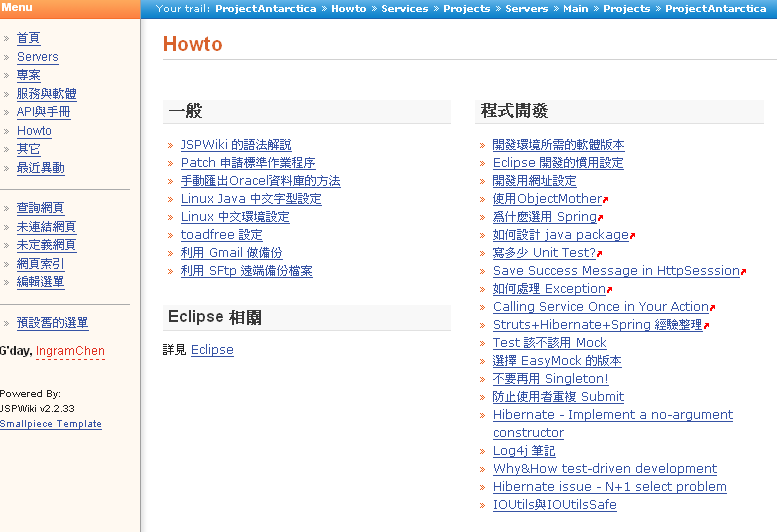
自從裡裝了個 JSPWiki 之後,開始把一些日常的資源往上面丟,做些小整理。試用一陣子之後,發現用 Wiki 整理文件真的超快,語法簡單,資料的相互連結打幾個字就搞定。也不用怕寫的不好,有問題直接改就行了。完全無痛 !! 總算是讓我這個 "死也不寫文件" 的人寫文件寫的心甘情願~~
喔... 我們不是拿來寫軟體規格書,還是啥 SA/SD 文件。主要是收集如何安裝、如何 deploy、或是一些開發的設定、像是 eclipse、資料庫... 等等資料。這些東西並不是每天在做,偶而才做一次而已 (例如新人報到,或是重灌電腦),因此很容易忘記,常常翻箱倒櫃亂找,找的滿頭大汗還不見得找得回來... 用 wiki 來整理這些資料再適合不過了,真恨自己以前不懂的用這個工具~~
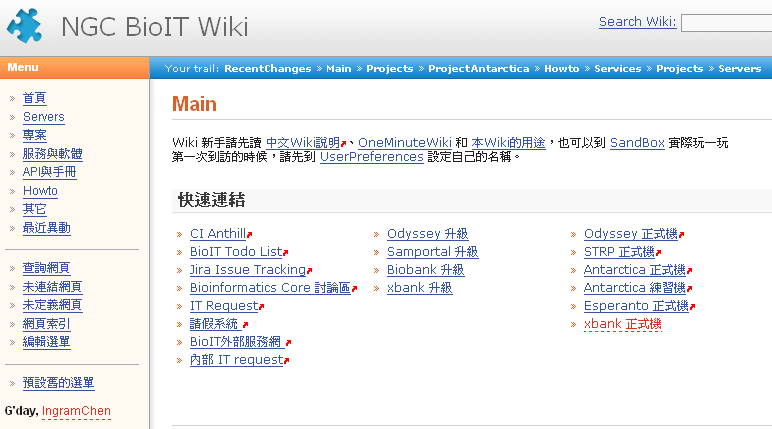
一些我們 wiki 的截圖:
首頁設計成提供快速的常用連結
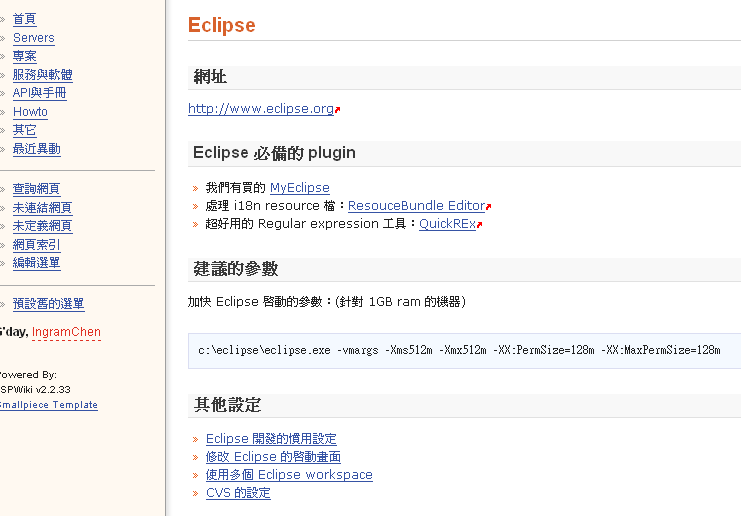
Eclipse 的相關設定
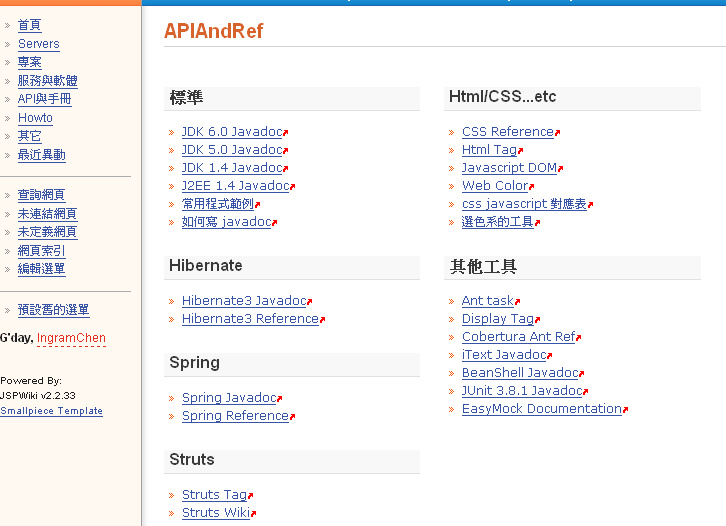
常用的 API 連結
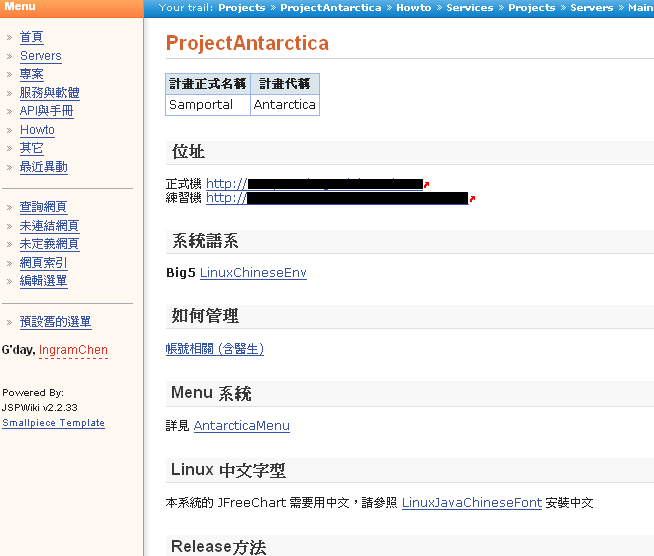
Project 的資料
收集一些對開發有益的文件
Wednesday, August 20, 2008
有關軟體開發流程
最近發現 Netbeans 的內部人員發表了在 Netbeans IDE 開發時的流程,這也是我一直想要推動及執行的。
唯有如此做,在台灣的軟體開發才能漸漸的上軌道。
I have worked on a lot of large software projects in the 17+ years I have been in the industry, and I don't say it lightly that I think NetBeans has one of the best development processes I've ever seen.
唯有如此做,在台灣的軟體開發才能漸漸的上軌道。
I have worked on a lot of large software projects in the 17+ years I have been in the industry, and I don't say it lightly that I think NetBeans has one of the best development processes I've ever seen.
I've been on (and seen) projects that were so overburdened with processes and documents that it was like walking through a lake of molasses.
I've also been on (and seen) projects where there was so little process that life was exciting, interesting, crazy, but basically one chaotic scramble after another.
NetBeans follow a beautiful middle path - not too much process, but not too little. I'm sure I'm missing a lot of important points and aspects that make this all fall together, but these are the ones that stand out to me:
Planning
The planning phase is fast and lightweight. Each release is given a release boss, and the release boss works to define a theme for the release. The release boss also decides on the dates for milestones and the final release. Then each team is asked to decide what features they feel best meet the theme, and for what milestones those features will be delivered.
Normally the feature list is written up quickly on a Wiki page. Each feature is given an issue number in Issuezilla and is assigned a person who owns it and a milestone date.
The release boss uses reporting features in Issuezilla to track all of the features committed for a given milestone, and you have the plan. Pretty simple. We all know what to do, and when we have to do it by, and we get to work.
Specification and Design
You are expected to specify the user experience and interface for your features. But it's in a very lightweight manner, on a Wiki page. Here is an example UI Spec that I wrote. Pretty simple, but it gets the point across.
Certain defining features get a lot of attention and are reviewed carefully by our User Experience team, but for most smaller features you just need to write up a quick spec, have it reviewed by your team, and you are done.
Milestones
I love milestones. I think every large team should have milestones. Basically these are a mini-release, where everyone has to get features in by a certain date, there is a stabilization period with extended QA and bugs are fixed, and then it gets published on the NetBeans site. Milestones normally happen about once every 4-6 weeks.
The main reason why I like these as a developer is because it keeps me focused. A six month development cycle tends to make you be lazy early on in the cycle. With milestones coming at you once a month, you get very focused, and you are working hard all the way through the release, instead of working insanely at the end. This also means that it is much more likely that we deliver on time, or if we're late, we know sooner rather than later. And what I have seen is that NetBeans has consistently delivered what we say we deliver, when we say we're going to deliver it. There is a lot behind this, but milestones are a key part of this.
Simple, Strong Quality Criteria
Every release has quality criteria. These are soft and hard goals in terms of the number of P1, P2 and P3 bugs. There is a total overall goal, and each team is also assigned specific goals. For some reason a lot of projects I have been on have not been that strict about this, and it has affected the quality of their product
Nightly Builds Available to the Community
What this means is everybody is using our stuff all the time, all the way through the release process, and we hear from them. I think this is great. More and more projects are doing this, and I really can't recommend it highly enough. And if you don't know about Hudson, you really should check it out.
The Team
This is a lot harder to reproduce, but as usual is a key part of it.
The theme running through this all of this and a thousand more details and steps, is a dedication to quality and predictability, without overburdening the teams with process and busywork. It's a difficult balance, and it's executed quite well here.
So I think that is probably the underpinning of why NetBeans development process rock: the team. From developers to management to QE to release engineering, I have never seen such a smart, dedicated, hardworking group of folks. I am really honored to work with them.
Source : NetBeans development process rocks!
Subscribe to:
Posts (Atom)